中国用户在线文档请咨询客服
bolang V4 Online Tutorial Materials
For usage-related questions, please send an email to hankecnc@gmail.com or join our Discord 💬
E-LINK Software Download (for wireless file transfer between controller and user computer)
Hello dear buyer, we are the direct manufacturer of this product. As this product is still under development, if you encounter any product issues, please contact us via email first. We will assist you in resolving the problem, or send replacement parts for repair, or process a return and refund. If you directly apply for a refund without any communication, it will be handled automatically by the AliExpress platform, and we will have no access to intervene, which makes it impossible to effectively resolve the issue.
Some users set the emergency stop signal to normally closed but do not actually connect an emergency stop switch, which causes the controller to trigger the emergency
stop signal, i.e. Alarm:10. When the controller is in the emergency stop state, you cannot run the machining program or change settings. You can short the controller’s
ESTOP terminal to GND, then power it off and restart it to clear the emergency stop alarm.
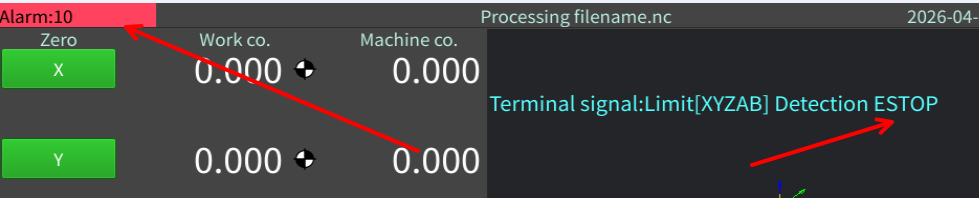

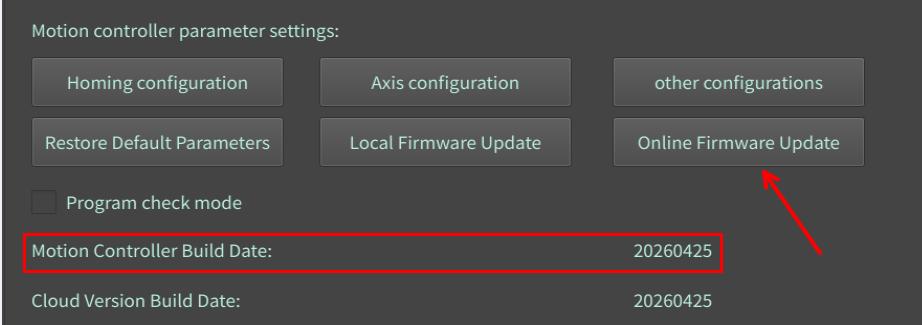
A few users have reported a popup message “Connection to the controller lost”. Please click “Online Firmware Update” to update the
controller firmware, and make sure the firmware date is on or after 2026-04-25.
Firmware and instructions for the dual Y-type gantry have been released.
https://www.bolangsk.cn/docs/dual-y-machine/
Methods to fix USB flash drive read problems, shipped before January 28, 2026.
https://www.bolangsk.cn/docs/usb-flash-drive-file-transfer/
It is recommended that you connect the controller to WiFi to keep the system software updated, as it is still being refined.
📢 Product Notice
🌍 January 24, 2026 – Added Russian, Spanish, and Polish language support. If you purchased earlier, simply connect to WiFi to update the host software. As these are machine translations, the quality may be rough. You can temporarily switch to English and wait for future translation improvements.
📦 Due to the global increase in eMMC and DDR chip prices, controllers purchased after January 1, 2026 will have the following changes:
💾 Internal eMMC: 8G → 4G
📂 User-available storage: 2.2G
🙏 Thank you for your understanding and continued support!