V5 users, please download the dual-Y firmware here:
https://www.bolangsk.cn/downloads/BoLang%20V5
For dual-Y machines, if you do not need gantry homing alignment,
you can use the controller’s default lower-computer firmware,
then connect the pulse/direction signals of the two Y-axis drivers in parallel to the Y-axis terminal of the controller.
In addition, we also provide two extra firmware versions,
one is the firmware without gantry homing enabled: https://www.bolangsk.cn/bolang/gujian_V1/xiaweiji/dual_y_no_auto_squaring.uf2
the other is the firmware with gantry homing enabled: https://www.bolangsk.cn/bolang/gujian_V1/xiaweiji/dual_y_with_auto_squaring.uf2
In both firmware versions above, Y2 uses the original B-axis pulse/direction and limit signal inputs,
Y2 inherits the axis parameters of Y1, in a shadow relationship, with no additional settings required.
If you use the firmware without gantry homing enabled, the Y2 limit switch does not need to be connected,
For the firmware above, please refer to the System Update Tutorial -> Update Lower-Computer Firmware section, and use the local file to update the firmware,
If you need to flash back to the factory default firmware, simply click Online Update,
After enabling gantry homing correction, there are 2 additional settings in Motion Controller Parameter Settings -> Other Settings,
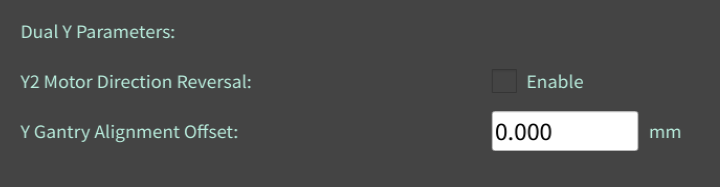
When your Y2 motor and Y1 motor are not installed on the same side, i.e., installed mirrored to each other, you can enable Y2 Motor Direction Reversal,
The Y Gantry Alignment Value is the installation error between the two Y-axis limit switches,
This value can be either positive or negative,
A dual-Y gantry has two errors: one is the gantry crossbeam,
and the other is the installation error of the two limit switches,
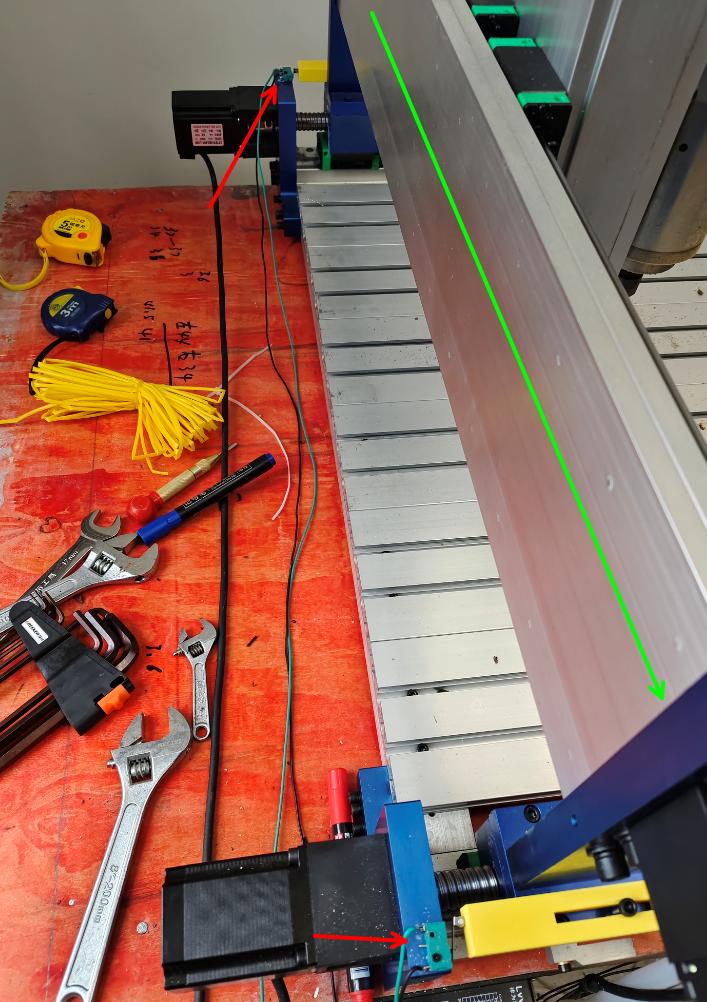
For the first homing, we first set the Gantry Alignment Value to 0,
That is, assuming the two limit switches are installed in absolute alignment,
Then perform homing. After homing touches the limit switches and stops, we measure the error between the two Y axes,
For example, one is 5mm from the Y axis and the other is 8mm from the Y axis, then enter the error value of 3mm into the Gantry Alignment Value,
Then perform homing again. This time, after both limit switches are touched and stopped, the system will additionally move the Y2 axis by this error value,
to correct the installation error of the limit switches,
If you still don’t understand, you can watch this demo homing animation: https://www.bolangsk.cn/bolang/wangye/gantry_homing_demo.html


