Upload files from PC

Quote from Guest on 2025年11月17日, pm9:51Hi,
Is it possible to upload G-code files from PC via USB cable. PC<----USB---->BoLang?
Is the only way to upload G-code files is via Wi-Fi?Thanks!
Hi,
Is it possible to upload G-code files from PC via USB cable. PC<----USB---->BoLang?
Is the only way to upload G-code files is via Wi-Fi?
Thanks!

Quote from 博朗 on 2025年11月18日, pm12:19Hello, the controller supports file transfer via WiFi network. The tutorial is located here: https://www.bolangsk.cn/docs/network-file-transfer/. File transfer via
USB flash drive is also supported.
Hello, the controller supports file transfer via WiFi network. The tutorial is located here: https://www.bolangsk.cn/docs/network-file-transfer/. File transfer via
USB flash drive is also supported.
Quote from Ivo Ivanov on 2025年11月18日, pm7:45Thanks for your fast replay!
I'm planing to buy two pieces from Aliexpress.
I have few more quuestions:1) In Aliexpres product page there is very limited documentation. Can you sand me a map of inputs/outputs?
2) Is it possible to attach a probe for Z-offset? What kind of probe?
3) Is there different versions of the product for 3/4/5 axis? The product page in Aliexpres does not explain how many axis can control.
Does that mean that the product can control up to 5 axis or I need to explicitly purchase the product with 5 axis for example?
Thanks for your fast replay!
I'm planing to buy two pieces from Aliexpress.
I have few more quuestions:
1) In Aliexpres product page there is very limited documentation. Can you sand me a map of inputs/outputs?
2) Is it possible to attach a probe for Z-offset? What kind of probe?
3) Is there different versions of the product for 3/4/5 axis? The product page in Aliexpres does not explain how many axis can control.
Does that mean that the product can control up to 5 axis or I need to explicitly purchase the product with 5 axis for example?
Quote from 博朗 on 2025年11月19日, am12:08You can click here to access the online documentation: <BoLang Documentation>.
Please note that I've recently begun offering this product on AliExpress,
though it has been successfully sold in China for 3 years. I'm currently
working to expedite the English documentation translation and will have it
completed within the next few days. Should you have any questions in the
meantime, please don't hesitate to reach out.
Yes, it can control up to 5 axes. You don't need to purchase a controller
for a specific number of axes. If you only use 3 axes, simply leave the
other axes unconnected. Honestly, those are just marketing gimmicks -
offering options like "3-axis", "4-axis", "5-axis", "6-axis"... For me,
each additional axis only adds a 1 RMB (~$0.14 USD) high-speed digital
isolator to the PCB hardware. I'm not interested in playing those
meaningless tricks.
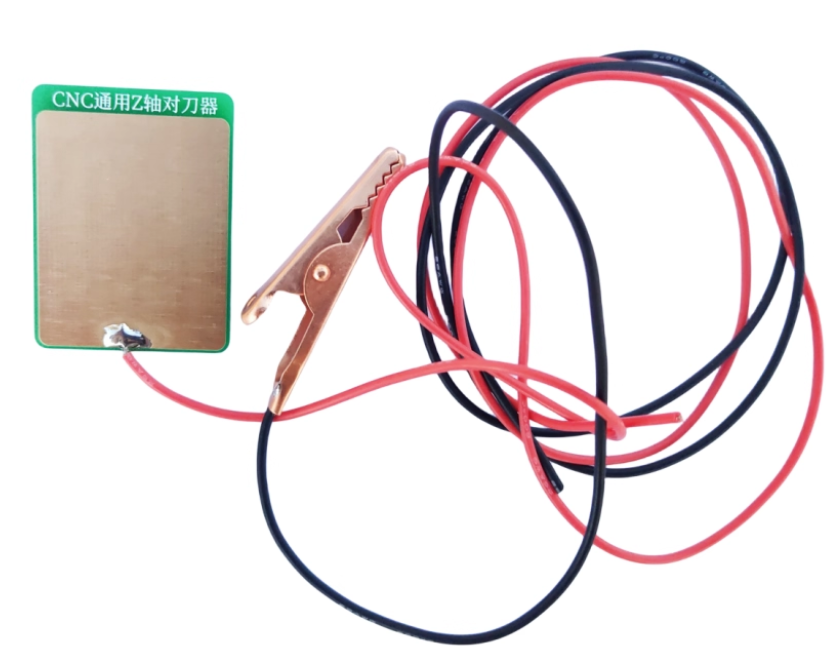
Yes, it can connect to a tool probe. You need to purchase an NPN-type
switch probe - both normally-open (NO) and normally-closed (NC) types
work. However, I'm currently using a DIY tool probe PCB that costs only
2 RMB (~$0.28 USD), and it works great. Simply place it on top of the
workpiece and run the probing script. If you need them, I'll include a
few for free with your order. The PCB contact surface has ENIG (gold)
finish, and the alligator clip is pure copper. I'm very satisfied with it.
You can click here to access the online documentation: <BoLang Documentation>.
Please note that I've recently begun offering this product on AliExpress,
though it has been successfully sold in China for 3 years. I'm currently
working to expedite the English documentation translation and will have it
completed within the next few days. Should you have any questions in the
meantime, please don't hesitate to reach out.
Yes, it can control up to 5 axes. You don't need to purchase a controller
for a specific number of axes. If you only use 3 axes, simply leave the
other axes unconnected. Honestly, those are just marketing gimmicks -
offering options like "3-axis", "4-axis", "5-axis", "6-axis"... For me,
each additional axis only adds a 1 RMB (~$0.14 USD) high-speed digital
isolator to the PCB hardware. I'm not interested in playing those
meaningless tricks.
Yes, it can connect to a tool probe. You need to purchase an NPN-type
switch probe - both normally-open (NO) and normally-closed (NC) types
work. However, I'm currently using a DIY tool probe PCB that costs only
2 RMB (~$0.28 USD), and it works great. Simply place it on top of the
workpiece and run the probing script. If you need them, I'll include a
few for free with your order. The PCB contact surface has ENIG (gold)
finish, and the alligator clip is pure copper. I'm very satisfied with it.
Quote from Guest on 2025年11月19日, pm7:59Does it also support threading for lathes with a spindle encoder?
Does it also support threading for lathes with a spindle encoder?
Quote from 博朗 on 2025年11月20日, am8:48Quote from Guest on 2025年11月19日, pm7:59Does it also support threading for lathes with a spindle encoder?
Our controller's motion control part (lower-level controller) is based on grblhal. It supports spindle-synchronized threading. The controller provides spindle
encoder pulse and index input signals. Since we don't have many lathe users at present, I have only briefly tested the G33 code, and it appears to be working fine.
Currently, our priority is implementing the automatic tool changer (ATC) function. We will test spindle threading later.
Quote from Guest on 2025年11月19日, pm7:59Does it also support threading for lathes with a spindle encoder?
Our controller's motion control part (lower-level controller) is based on grblhal. It supports spindle-synchronized threading. The controller provides spindle
encoder pulse and index input signals. Since we don't have many lathe users at present, I have only briefly tested the G33 code, and it appears to be working fine.
Currently, our priority is implementing the automatic tool changer (ATC) function. We will test spindle threading later.
Quote from Ilia on 2025年11月28日, pm9:42I also purchased one of your controllers V4 on Ali great little controller. Love to try the hard threading function can you please help with advise on how to add spindle encoder signals to controller.
Any will be much appreciated if you give input parameters like pilce train speed they can handle for example, is all inputs have same speed or there particular one should be used for spindle encoder input?
Thanks in advance for your help.
Hello. As I mentioned above, this controller is based on grblHAL and it does support the threading function for lathes. I’ve only run a simple test of the G33
threading command on a development board (without connecting to a real lathe), but it appeared to work. In hardware I only broke out the pulse and index signals, and
the AliExpress product listing doesn’t officially state that it supports lathe threading. I need to implement automatic tool changing first, then move on to threading
tests. Also, the isolated pulse and index signals on the current hardware version aren’t soldered. You could look at the schematic and desolder the digital isolation
chip from the unused A/B axes, then solder it in that location.
source code:https://www.bolangsk.cn/docs/source-code/
• I think the best thing for you is to wait—or download the grblHAL source code, schematic, and PCB above, if you’re really skilled…
I also purchased one of your controllers V4 on Ali great little controller. Love to try the hard threading function can you please help with advise on how to add spindle encoder signals to controller.
Any will be much appreciated if you give input parameters like pilce train speed they can handle for example, is all inputs have same speed or there particular one should be used for spindle encoder input?
Thanks in advance for your help.
Hello. As I mentioned above, this controller is based on grblHAL and it does support the threading function for lathes. I’ve only run a simple test of the G33
threading command on a development board (without connecting to a real lathe), but it appeared to work. In hardware I only broke out the pulse and index signals, and
the AliExpress product listing doesn’t officially state that it supports lathe threading. I need to implement automatic tool changing first, then move on to threading
tests. Also, the isolated pulse and index signals on the current hardware version aren’t soldered. You could look at the schematic and desolder the digital isolation
chip from the unused A/B axes, then solder it in that location.
source code:https://www.bolangsk.cn/docs/source-code/
• I think the best thing for you is to wait—or download the grblHAL source code, schematic, and PCB above, if you’re really skilled…
Quote from 博朗 on 2025年11月29日, am7:56Quote from Ilia on 2025年11月28日, pm9:42I also purchased one of your controllers V4 on Ali great little controller. Love to try the hard threading function can you please help with advise on how to add spindle encoder signals to controller.
Any will be much appreciated if you give input parameters like pilce train speed they can handle for example, is all inputs have same speed or there particular one should be used for spindle encoder input?
Thanks in advance for your help.
Hello. As I mentioned above, this controller is based on grblHAL and it does support the threading function for lathes. I’ve only run a simple test of the G33
threading command on a development board (without connecting to a real lathe), but it appeared to work. In hardware I only broke out the pulse and index signals, and
the AliExpress product listing doesn’t officially state that it supports lathe threading. I need to implement automatic tool changing first, then move on to threading
tests. Also, the isolated pulse and index signals on the current hardware version aren’t soldered. You could look at the schematic and desolder the digital isolation
chip from the unused A/B axes, then solder it in that location.
source code:https://www.bolangsk.cn/docs/source-code/
• I think the best thing for you is to wait—or download the grblHAL source code, schematic, and PCB above, if you’re really skilled…
A bit of a mess—I accidentally hit “Edit” instead of “Quote,” but let’s leave it for now.
Quote from Ilia on 2025年11月28日, pm9:42I also purchased one of your controllers V4 on Ali great little controller. Love to try the hard threading function can you please help with advise on how to add spindle encoder signals to controller.
Any will be much appreciated if you give input parameters like pilce train speed they can handle for example, is all inputs have same speed or there particular one should be used for spindle encoder input?
Thanks in advance for your help.
Hello. As I mentioned above, this controller is based on grblHAL and it does support the threading function for lathes. I’ve only run a simple test of the G33
threading command on a development board (without connecting to a real lathe), but it appeared to work. In hardware I only broke out the pulse and index signals, and
the AliExpress product listing doesn’t officially state that it supports lathe threading. I need to implement automatic tool changing first, then move on to threading
tests. Also, the isolated pulse and index signals on the current hardware version aren’t soldered. You could look at the schematic and desolder the digital isolation
chip from the unused A/B axes, then solder it in that location.
source code:https://www.bolangsk.cn/docs/source-code/
• I think the best thing for you is to wait—or download the grblHAL source code, schematic, and PCB above, if you’re really skilled…
A bit of a mess—I accidentally hit “Edit” instead of “Quote,” but let’s leave it for now.
Quote from Ilia on 2025年12月13日, am6:45Can you give more information how to configure , script path, of physical buttons please.
Thanks in advance
Can you give more information how to configure , script path, of physical buttons please.
Thanks in advance
Quote from 博朗 on 2025年12月14日, pm8:36Quote from Ilia on 2025年12月13日, am6:45Can you give more information how to configure , script path, of physical buttons please.
Thanks in advance
https://www.bolangsk.cn/docs/macro-button/
Quote from Ilia on 2025年12月13日, am6:45Can you give more information how to configure , script path, of physical buttons please.
Thanks in advance
Security Check
Your post contains a URL link.
Please verify you are human to continue.