bolang cnc
  • BoLang Documentation
  • Forum
  • RP2350 GRBLHAL Control Board

BoLang Documentation

  • Quick Start
    • Installation Dimensions
    • Language Switch
    • Power Connection and Startup
  • Wiring and Setup
    • Extra Digital Control Output
    • Machine Coordinates Save/Restore
    • CAM Post-processor
    • Output port controls relay
    • Limit switches / Homing
    • Settings Backup and Restore
    • 3D Tool Path Simulation
    • Spindle Control
    • Change boot splash screen
    • Connect Stepper/Servo Motor
    • source code
    • Connect handwheel
    • Update System Program
    • File Management
      • Network File Transfer

RP2350 GRBLHAL Control Board

  • Product Introduction
View Categories
  • Home
  • Docs
  • BoLang Documentation
  • Wiring and Setup
  • Connect handwheel

Connect handwheel

For the controller handwheel, only the handwheel from our store is supported.


It uses RS232 one-way serial communication and requires only 3 wires to work.
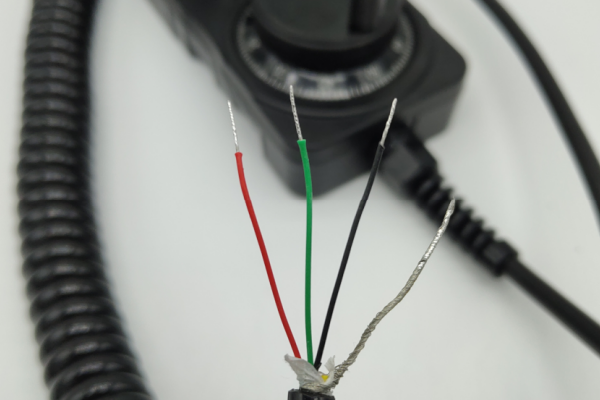
 

Handwheel Usage and Wiring


The red wire (5V) and black wire (GND) power the handwheel – connect them to any 5V and GND on the controller.


The green wire or the remaining wire connects to the MPG interface.
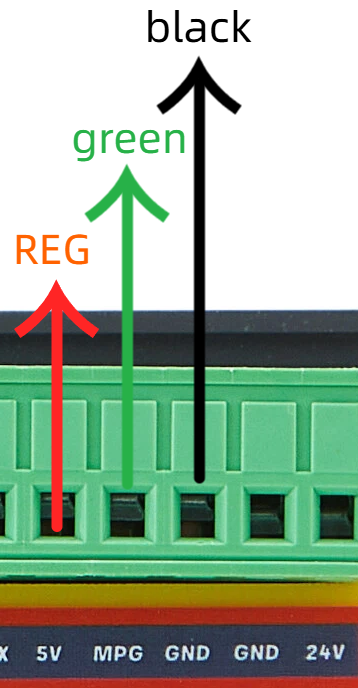


It is recommended to connect when the controller is powered off. Hot-plugging has a very small chance of damaging the SP3232 chip, which would cause the handwheel to stop working.


If you already have a handwheel, you can purchase the universal handwheel adapter board sold in our store.


Wire it the same way as your original handwheel – solder the axis selection, multiplier selection, and encoder A/B to the adapter board, then connect 5V, GND, and MPG to the control board as described above.


No need to disassemble or damage your original handwheel – simply solder the corresponding wires to this adapter board.


This essentially completes an adapter conversion.


What are your Feelings

Share This Article :

  • Facebook
  • X
  • LinkedIn
  • Pinterest
Updated on 2025年11月20日
Theme by 云落