The controller program is divided into host computer and lower computer programs.
The program can be upgraded online via wifi connection.
You can also use a U disk or E-Link software to transfer the firmware program to the controller for upgrading.
Update Host Computer Program #
The update button for the host computer is shown as follows:
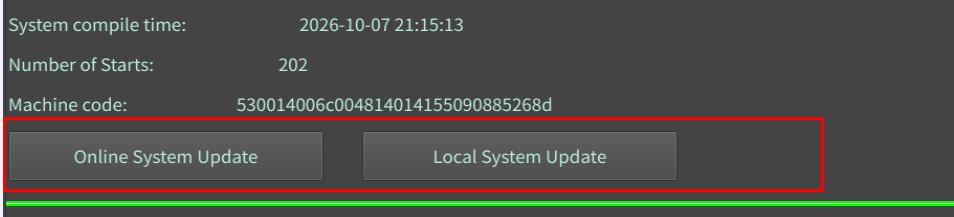
Online update only requires connecting to a wifi network with internet access.
For local update, you need to download 1 files and transfer them to the controller using U disk or E-Link, to the /home/pi/cnc root directory.
Main program: https://www.bolangsk.cn/bolang/gujian_V1/shangweiji/enc.zip
The address for the V5 version is:https://www.bolangsk.cn/bolang/gujian_V2/shangweiji/enc.zip
Update Lower Computer Firmware #
The update button for the lower computer is shown as follows:
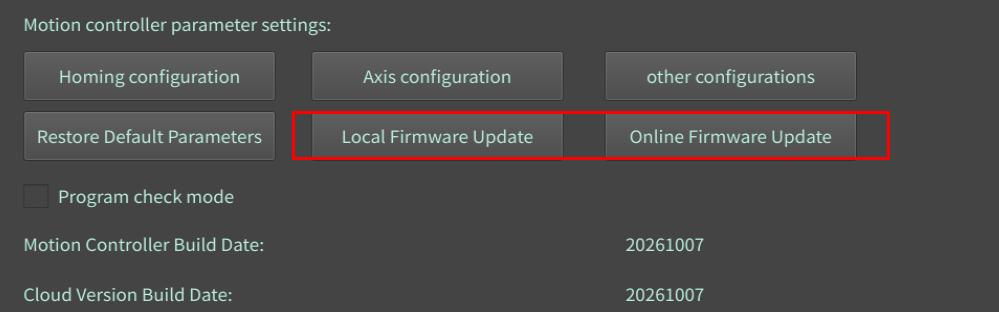
For local update, you need to download 1 firmware file and transfer it to the controller using U disk or E-Link, to the /home/pi/cnc root directory.
Firmware: https://www.bolangsk.cn/bolang/gujian_V1/xiaweiji/5X.uf2
The address for the V5 version is:https://www.bolangsk.cn/bolang/gujian_V2/xiaweiji/5X.uf2
After the update is completed, a power cycle is required for it to take effect.


